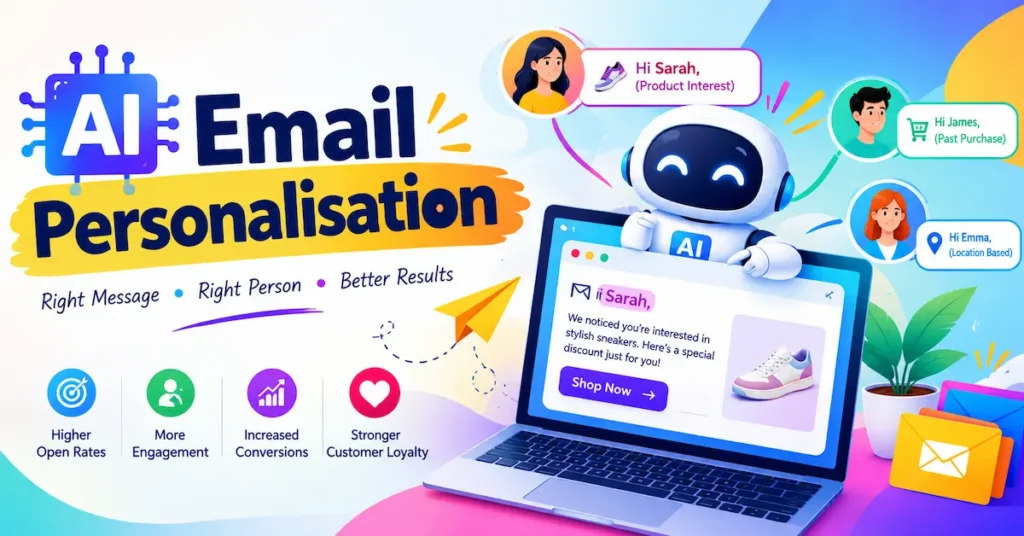
In futuristics, AI email personalisation at scale sounds like a big-brand luxury, yet a solo freelancer can now set it up in an afternoon. The old options were bad: write the same email 300 times by hand, or send one bland blast and hope. Both waste time and money.
This guide shows you how to build a repeatable system. You’ll learn what data to collect, which tools to use, how to prompt AI so emails still sound like you, and how to measure results. You’ll also get the legal basics for the USA, UK, Canada and Australia. First, let’s clear up what personalisation really means.
What AI Email Personalisation Actually Means (and Why It Scales)
AI email personalisation means using software to tailor each message to the recipient’s behaviour, interests and stage in the buying journey. Adding “Hi Sam” to a subject line doesn’t count. That’s mail-merge from the 1990s.
Scale comes from three parts working together. Data tells the tool who someone is. Rules decide who gets which message. Free AI Email Automation writes or adapts the copy so you aren’t drafting 20 versions yourself.
Picture a freelance designer with 300 past leads. People who asked about logos get a portfolio update. People who went quiet after a quote get a friendly pricing reminder. It’s the same hour of work with very different replies.
Readers notice when you get this wrong.
📊 76% of consumers feel frustrated when companies fail to deliver personalised interactions — McKinsey, 2021
Key Takeaway: Real personalisation reflects what a person did or asked for, and AI makes that possible for hundreds of contacts at once.
4 Data Points That Power AI Email Personalisation
You don’t need a data warehouse. Start with four signals you probably already have.
Behaviour Signals
Which links did they click? Which pages did they visit? Behaviour shows genuine interest far better than a job title does.
Purchase and Enquiry History
What did they buy, request or abandon? This is the strongest trigger for follow-ups, cross-sells and win-back emails.
Profile and CRM Details
Industry, role, company size and location help you adjust tone and examples. A UK accountant and a Canadian ecommerce owner care about different things.
Context and Timing
Time zone, signup date and lifecycle stage tell you when to send. A new subscriber needs a welcome, not a discount code.
Collect only what you’ll actually use. Every extra field is something to keep accurate and secure. Ask through a short signup form or preference centre instead of guessing.
💡 Pro Tip: Add one question to your signup form today, such as “What’s your biggest email goal?”, and use the answers as segments.
Key Takeaway: Four simple signals (behaviour, history, profile and timing) are enough to personalise emails properly.
A 5-Step Workflow to Personalise Emails at Scale
This is the system to copy. It works whether you have 200 contacts or 20,000.
Set Up the Foundations (Steps 1–3)
- Pick one goal. Replies, bookings or sales. Not all three.
- Build 3 to 5 segments. For example: new subscribers, active buyers, lapsed leads and hot prospects.
- Write one human-made “master” email per segment. This is your voice reference for the AI.
Launch and Learn (Steps 4–5)
- Use AI to create variations. Feed it the master email plus segment data, and have it adjust the opening, examples and call to action.
- Test, then automate. Send to a small slice, check results, then turn the winner into an automated flow.
📌 Real Example: A jewellery and accessories brand in Australia used Klaviyo segmentation and automated flows to grow conversion value from flows by 39.8% year on year in 2024, according to Klaviyo’s published case study.
Key Takeaway: Segment first, write one strong master email, then let AI handle the variations.
6 Best Tools for AI Email Personalisation in 2026
The right tool depends on whether you sell products, run campaigns or send outreach. Here’s how six popular platforms compare, with both USD and GBP pricing.
Klaviyo
- Best For: Online shops (Shopify, WooCommerce)
- Free Plan: Yes
- Starting Price: $20 / £16 per month
- Rating: ⭐⭐⭐⭐⭐ (4.7/5)
Mailchimp
- Best For: Beginners and simple newsletters
- Free Plan: Yes
- Starting Price: $13 / £10 per month
- Rating: ⭐⭐⭐⭐☆ (4.2/5)
ActiveCampaign
- Best For: Automation-heavy small businesses
- Free Plan: No (14-day trial)
- Starting Price: $15 / £12 per month
- Rating: ⭐⭐⭐⭐⭐ (4.5/5)
Brevo
- Best For: Tight budgets and larger lists
- Free Plan: Yes
- Starting Price: $9 / £7 per month
- Rating: ⭐⭐⭐⭐☆ (4.3/5)
Lemlist
- Best For: B2B cold outreach
- Free Plan: No (trial)
- Starting Price: $55 / £43 per user/month
- Rating: ⭐⭐⭐⭐☆ (4.2/5)
Instantly
- Best For: High-volume cold email
- Free Plan: No (trial)
- Starting Price: $30 / £24 per month
- Rating: ⭐⭐⭐⭐☆ (4.3/5)
Prices are entry-level, typically on annual billing, and change with contact count. GBP figures are approximate conversions, so check each vendor’s page before buying.
If you sell products, start with Klaviyo. If you’re a freelancer with a modest list, Brevo or Mailchimp keeps costs low. For cold outreach, choose Lemlist or Instantly, and read the legal section below first.
All six work for buyers in the USA, UK, Canada and Australia. Pricing is billed in USD by default, so expect small currency differences at checkout. Whichever you choose, the best email personalization tools are the ones you’ll actually use weekly.
Key Takeaway: Match the tool to your business model (shop, newsletter or outreach), not to the longest feature list.
How to Personalise Emails with AI Without Sounding Robotic
AI saves time, but only if you steer it. Vague prompts produce vague emails.
A Prompt Template That Works
“You are a friendly copywriter for [business]. Rewrite the email below for [segment]. Mention [specific behaviour or purchase]. Keep it under 120 words, use plain English, and end with one clear call to action.”
Always paste in your master email and a short voice note, such as “warm, direct, no hype”. The more specific the context, the less generic the result.
💡 Pro Tip: Before every send, read five random AI-written emails aloud. If one sounds like a robot, tighten your prompt.
Legal Guardrails by Country
Personalisation uses personal data, so the rules matter. This is general information, not legal advice.
- USA: CAN-SPAM requires a working unsubscribe link and your physical address.
- UK: UK GDPR and PECR require a lawful basis and, for most marketing to individuals, consent.
- Canada: CASL requires express or implied consent, plus a clear unsubscribe.
- Australia: The Spam Act 2003 requires consent, sender identification and an unsubscribe option.
Cold outreach is where most freelancers slip, so check your target country’s rules before importing a list.
Key Takeaway: Give AI email automation specific context and a voice reference, and respect consent rules in every market you email.
How to Measure Results and Avoid 3 Common Mistakes
Good personalisation shows up in clicks, replies and revenue, not just opens.
Metrics That Matter
Track click rate, reply rate, conversions and revenue per recipient. Open rates are unreliable because Apple Mail Privacy Protection inflates them. Compare each personalised segment against your old generic send.
3 Mistakes That Hurt Results
- Over-personalising. Mentioning details that feel like surveillance creeps people out. Stick to things they told you or did with you.
- Skipping data hygiene. A wrong name or outdated purchase makes you look careless. Clean your list monthly.
- Trusting AI blindly. Always review claims, prices and offers before sending.
Run one test at a time, give it a week, and keep the winner. Small, steady improvements beat one dramatic overhaul.
Key Takeaway: Judge personalisation by clicks, replies and revenue, and fix data quality before adding more AI email automation saas onboarding.
Frequently Asked Questions
It's using AI to tailor email content, timing and offers to each recipient based on their data and behaviour. It goes well beyond inserting a first name.
Segment your list, write one strong master email per segment, then use AI to create variations. Automate the winners as flows so they run without manual work.
Yes, if you have even a few hundred contacts. Entry-level tools start around $9–$20 (£7–£16) a month, and AI saves hours of manual writing.
Klaviyo suits online shops, Brevo and Mailchimp suit tight budgets, and ActiveCampaign suits complex automation. For cold outreach, Lemlist and Instantly are popular.
Yes, when you give it a voice sample, a specific audience and clear limits. Always read and edit the output before sending.
Start with behaviour (clicks, visits), purchase or enquiry history, basic profile details and timing. Collect only what you'll actually use.
Generally yes, provided you follow local rules such as CAN-SPAM (USA), UK GDPR and PECR, CASL (Canada) and the Spam Act (Australia). Consent and easy unsubscribing are the key requirements.
Three to five is plenty. More segments create more content to manage without necessarily improving results.
Common causes are poor data, weak subject lines, over-personalising or sending too rarely to learn anything. Test one change at a time.
Not on their own. Privacy features inflate opens, so focus on clicks, replies and conversions.
Final Thoughts
AI email personalisation at scale comes down to three things: clean, simple data; a repeatable workflow of segments, a master email and AI variations; and honest measurement through clicks and revenue. Respecting consent rules keeps the whole system sustainable.
You don’t need a big team or budget to start. Pick one segment, send one tailored email this week, and let the results guide your next move.