AI client communication tools are no longer a luxury reserved for large agencies. Freelancers, consultants, and small business owners across the USA, UK, Canada, and Australia are using them to handle the avalanche of emails, follow-ups, check-ins, and status updates that eat up half the working week. The average knowledge worker spends 28% of their workweek on email alone — that’s more than 11 hours every week on messages.
The futuristics, this guide breaks down exactly which tools are worth your time in 2026, how to use them without losing the personal touch clients pay for, and the three automation workflows you can set up this week. Let’s start with the problem most people don’t name correctly.
Why Client Communication Is the Hidden Time Drain Nobody Talks About
People complain about the admin. They complain about scope creep and bad briefs. But the real time killer — the one that quietly steals three to four hours every day — is reactive communication.
A client email at 9 am. You respond at 10. They reply at 2. You follow up at 4. Nothing actually happened. But you’ve touched that conversation four times and made zero progress on deliverables.
Multiply that across five clients, and you’re essentially working a second, unpaid job.
The problem isn’t that clients are demanding. It’s that there’s no system behind the communication. Every update is manual, every follow-up is written from scratch, and every check-in depends on you remembering to send it.
📊 According to Salesforce’s State of the Connected Customer report, 83% of customers expect immediate engagement when they contact a company — but most small businesses respond to client emails in four hours or more. — Salesforce, 2026
Freelancers in the UK running solo operations feel this especially acutely. No support team, no account manager, no buffer. Just you, the inbox, and 14 unread messages before 8 am.
AI communication tools don’t replace the relationship. They handle the logistics, so the relationship actually has room to breathe. E-commerce improves posting consistency across multiple social media platforms.
Key Takeaway: Reactive, manual communication is the single biggest hidden cost for freelancers and small business owners — and it’s entirely solvable with the right automation stack.
What Makes a Great AI Client Communication Tool in 2026
Not all AI communication tools are built the same. Some are email drafters. Some are full CRM systems with AI layered on top. Some specialize in meeting follow-ups. Knowing what to look for before you buy saves you from paying for features, you’ll never use.
Personalization at Scale
The best tools in 2026 don’t just send pre-written templates. They pull in context — client name, project stage, last interaction date, tone of previous messages — and generate drafts that feel specific, not canned. If your client communication sounds like a mass email, it’s doing more damage than silence.
Inbox Intelligence and Prioritization
A growing category of AI tools doesn’t just draft emails — it reads your inbox and tells you what needs a response today, what can wait, and what’s already been handled. For freelancers managing five or more active clients, this triage layer alone saves an hour a day.
Native Integrations
Compliance-Friendly for UK and Australian Markets
GDPR (UK and EU) and Australia’s Privacy Act 1988 place specific obligations on how automated communications handle personal data. Any tool you use with clients in those markets needs clear data processing terms. Always check the tool’s privacy policy before connecting it to client data.
💡 Pro Tip: Before onboarding any AI communication tool, run a 5-minute integration audit. List every platform where client data currently lives — email, CRM, project tool, invoicing — and only choose tools that connect to at least three of them natively.
Key Takeaway: The best AI communication tools combine smart personalization, inbox triage, and solid integrations — not just faster email drafting. AI customer feedback tools help businesses gather customer insights quickly and accurately.
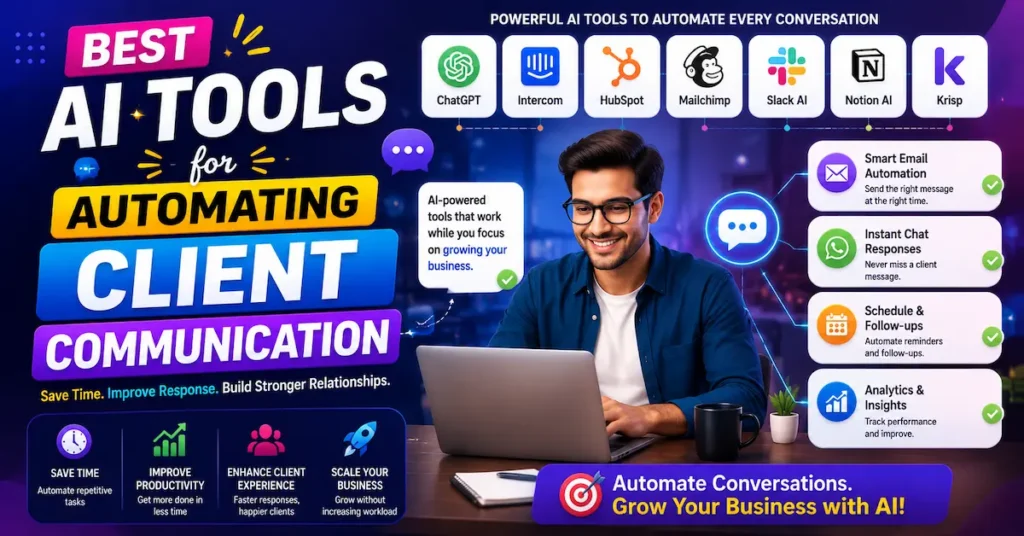
7 Best AI Client Communication Tools Right Now
The market has matured fast. Here are the tools actually delivering results for freelancers and small teams in 2026.
Here’s a side-by-side breakdown of the top options available today:
| Tool | Best for | Free Plan | Starting Price (USD / GBP) | Our Rating |
|---|---|---|---|---|
| Superhuman | Power email users needing AI triage | No | $30/mo / £24/mo | ⭐ 4.8/5 |
| HubSpot AI (Sales Hub) | CRM + automated client follow-ups | Yes (limited) | $20/mo / £16/mo | ⭐ 4.6/5 |
| Front | Team client communication + AI drafts | No | $29/mo / £23/mo | ⭐ 4.5/5 |
| Missive | Collaborative inbox + AI replies | Yes (limited) | $18/mo / £14/mo | ⭐ 4.4/5 |
| Magical | Auto-fill + AI email snippets | Yes | $10/mo / £8/mo | ⭐ 4.3/5 |
| Compose AI | Gmail AI writing assistant | Yes | $9.99/mo / £8/mo | ⭐ 4.2/5 |
| Otter.ai | Meeting summaries + client follow-up drafts | Yes (limited) | $16.99/mo / £14/mo | ⭐ 4.4/5 |
For most freelancers just getting started with automation, HubSpot’s free CRM with its AI email tools is the smartest entry point — it handles follow-up sequencing, tracks email opens, and integrates with Gmail or Outlook without a steep learning curve.
Key Takeaway: The right tool depends on your workflow — if you live in your inbox, Superhuman; if you need CRM + communication in one, HubSpot; if you’re running team client accounts, Front.
How to Automate Your Client Emails Without Sounding Like a Robot
This is where most people get it wrong. They automate everything, the client notices, and the relationship quietly chills. Done right, automation should be invisible.
Write Your Templates the Way You Actually Talk
Before automating anything, write three to five core email templates in your own voice. Not formal, not corporate — the way you’d actually respond to a client you’ve worked with for two years. Use contractions. Keep sentences short. Drop the “I hope this email finds you well.”
Once those templates exist, your AI tool has something real to personalize from, rather than generating generic text from scratch every time.
Use AI for First Drafts, Not Final Sends
The best workflow is: AI drafts, you review, you send. Never fully automate client-facing emails without a human review step unless they’re pure logistics (meeting confirmations, invoice reminders, delivery receipts). Anything that requires judgment — a concern, a revision request, a timeline change — needs your eyes on it before it goes out.
Segment by Client Relationship Stage
New client (first 30 days): higher-touch, more manual review. Ongoing client (3+ months): More automation is appropriate because they know you. Wrapping up or re-engagement: human-written, always. Knowing which stage each client is in determines how much you should automate each interaction.
📌 Real Example: A freelance web designer in Toronto, Canada, used HubSpot’s AI email sequences to automate weekly project update emails across 12 active client accounts. Instead of writing 12 individual updates every Friday afternoon, she built a single AI-personalized template sequence that pulled in project-specific details via CRM tokens. The result: her Friday admin time dropped from 3.5 hours to under 45 minutes. Source: HubSpot Customer Stories — hubspot.com/customer-stories
Key Takeaway: Automation works best as a drafting and sequencing layer — the human voice and judgment behind the message is still what builds client trust.
3 Communication Workflows You Can Automate This Week
No long setup required. These three workflows take a few hours to build and deliver immediate time savings.
Workflow 1: Automated Project Update Emails
Trigger: every Monday at 9am (or your project cadence) Content: AI-drafted update pulling from your project management tool (Asana, Notion, or Trello) via Zapier Review time: 3 minutes per client Send: after quick scan
This keeps clients in the loop without you writing a fresh update from scratch every week. Clients in the USA and Australia especially value consistent, proactive communication — it dramatically reduces the number of “just checking in” emails you receive.
Workflow 2: Proposal Follow-Up Sequence
Trigger: 48 hours after a proposal is sent with no response. Sequence: 3 emails over 7 days, written in your tone, escalating gently from reminder to value reinforcement to last-call. Tool: HubSpot Sequences, Front, or a Zapier + Gmail workflow
This alone can lift your proposal conversion rate. Most freelancers follow up once, awkwardly, two weeks late. An automated sequence does it at exactly the right time.
Workflow 3: Onboarding Welcome Series
Trigger: new project signed (manually or via CRM deal stage). Sequence: 4 emails over 10 days covering welcome, what to expect, how to communicate with you, and a kickoff meeting invite. Result: clients feel taken care of from day one without you personally writing every message
 Pro Tip: Build your onboarding email sequence before you need it — ideally during a quiet week between projects. Once it exists, it runs every time you sign a new client with zero additional work.
Key Takeaway: These three automation workflows — project updates, proposal follow-ups, and onboarding — cover roughly 60% of the routine client communication most freelancers handle manually every week.
Mistakes That Kill Client Relationships When You Over-Automate
Automation done wrong isn’t just inefficient — it actively damages the trust you’ve worked hard to build.
Sending Automated Replies to Urgent Messages
If a client emails you about a problem, an automated “Thanks for your message, I’ll be in touch within 24 hours” response is gasoline on a fire. Any AI tool you set up should be configured to flag or exclude messages with urgency signals — words like “urgent,” “ASAP,” “issue,” “error,” or “problem” — and route those to your immediate attention.
Using One Template Voice Across All Clients
A long-term client who’s become almost a collaborator will notice immediately if your emails suddenly sound like customer service scripts. Segment your templates by relationship depth. Your most valuable clients should receive the most customized communication — even if it’s still AI-assisted.
Automating the Wrong Things
Automate logistics and reminders. Never automate relationship moments. Congratulating a client on a product launch, acknowledging a tough week they mentioned, or following up on a personal detail they shared — those are human moments. Keep them human.
For UK-based freelancers operating under GDPR, also review your tool’s data retention settings before automating any client emails. Under GDPR, clients have the right to know what personal data is held and how it’s processed — your automation tool is part of that picture. AI automates sales funnels to increase conversions and efficiency.
Key Takeaway: The line between helpful automation and robotic communication is trust — protect it by keeping human judgment in every workflow that involves emotion, urgency, or relationship-building.
Frequently Asked Questions
AI client communication tools are software platforms that use artificial intelligence to help draft, send, schedule, and manage client-facing messages. They range from AI email writers to full CRM systems with automated follow-up sequences built in.
They reduce the time spent writing repetitive messages by generating personalized drafts, automating follow-up sequences, and prioritizing your inbox so you focus only on what needs a human response. Most freelancers save between 2 and 5 hours per week after setting up a basic automation stack.
Yes, as long as you maintain a human review step for anything sensitive and choose a tool that complies with the data regulations in your market — GDPR for UK and EU clients, Australia's Privacy Act for Australian clients, and CASL for Canadian clients.
For solo freelancers, HubSpot's free CRM with AI email tools or Compose AI for Gmail are the most practical starting points. Both are affordable (under $20/month / £16/month), require no technical setup, and integrate with the tools most freelancers already use.
Modern AI communication tools can pull in client-specific data — name, project stage, last interaction, tone of past messages — to generate drafts that feel tailored rather than templated. The output still benefits from a quick human review before sending.
Usually, the underlying templates were written in generic business language rather than the sender's natural voice. AI tools generate from the templates you give them — if the source material is cold and formal, the output will be too.
For most small businesses handling more than three to five active client relationships, yes. The time savings alone — typically 2–5 hours per week — far exceed the cost of tools that start at $10–$30/month (£8–£24/month).
Start with a CRM tool like HubSpot or Front, create a sequence of 2–4 emails, configure the trigger (e.g., 48 hours after proposal sent), write the templates in your own voice, and activate. Most platforms walk you through this setup in under an hour.
An AI email writer (like Compose AI or Magical) helps you draft individual messages faster. An AI communication platform (like HubSpot or Front) manages entire client relationships — tracking interactions, automating sequences, and integrating with your CRM and project tools.
Yes. Most leading tools support multi-language drafting and timezone-aware scheduling. For international clients, tools like Front and HubSpot are particularly strong because they handle team handoffs, translation, and time-based send optimization across regions.
Final Thoughts
The best AI client communication tools in 2026 do three things well: they draft messages in your voice, automate the logistics you shouldn’t be doing manually, and integrate with the tools already running your business. Whether you’re a freelancer in the UK managing a full client roster alone or a small agency in Australia handling a growing team, the time savings are real, and the setup is simpler than most people expect.
Automation is no longer about working harder — it’s about designing systems that work when you’re not. Build yours now and reclaim the hours that belong to real work.