In the futuristics, AI email automation vs manual email isn’t really a question of preference anymore, it’s a question of numbers. Knowledge workers spend up to 28% of their workweek reading, writing, and managing email, and most of that time goes toward messages that follow a predictable pattern. This article compares the real time, cost, and accuracy differences between doing email by hand and letting AI handle the repetitive parts, using current 2026 data instead of vendor claims. You’ll walk away knowing exactly where manual email still wins, where it doesn’t, and how to switch without breaking anything. Let’s start with what actually separates the two approaches.
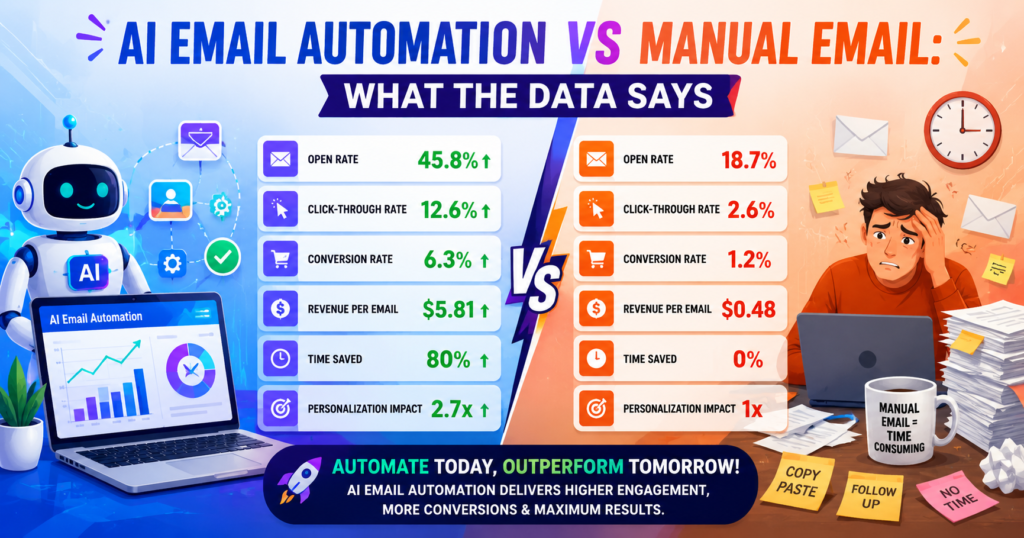
AI Email Automation vs Manual Email: The Real Difference
Manual email means every step, reading, deciding, drafting, sending, is done by a person, every single time. There’s no memory of the last 50 times you answered a similar question; you’re starting from a blank reply box again, no matter how many times you’ve written something nearly identical before.
AI email automation changes the workflow at three points: it reads and categorizes incoming messages by intent, it drafts a reply based on context and your writing history, and it can trigger a follow-up action, like a CRM update, without you touching the keyboard. None of these steps require you to give up final control, they just remove the blank-page problem.
The distinction that matters most isn’t speed, it’s repetition. A human replying to one email and an AI replying to one email aren’t that different in quality. The gap opens up at scale, when the same three or four message types show up dozens of times a week and a human has to write them fresh every time while AI reuses learned context instead of starting over.
That’s also where most of the confusion comes from. People compare a single AI-drafted reply to a single human reply and conclude the difference is small. The real comparison is a week of inbox management against a week of automated triage and drafting, and that’s where the gap becomes obvious, both in hours saved and in how consistent the responses feel across dozens of messages.
Key Takeaway: The advantage of AI email automation isn’t a smarter single reply, it’s removing the cost of repeating the same work hundreds of times a week.
How Much Manual Email Actually Costs You
This is the part most freelancers and small business owners underestimate, because the cost hides inside a normal working day rather than showing up as a line item.
📊 Knowledge workers spend up to 28% of their workweek, more than 11 hours, reading, writing, and managing email — McKinsey, 2026
Run that through a real hourly rate and the number gets uncomfortable fast. A freelancer or consultant billing $50 an hour in the USA who spends 10 hours a week on email is effectively giving up $500 a week, or roughly $26,000 a year, in billable capacity that never gets recovered. That’s not a hypothetical, it’s the same 10 hours whether you notice it or not.
It’s not just time. Manual email also has a hidden error rate: missed follow-ups, delayed replies to hot leads, and inconsistent tone across a team, none of which show up on an invoice but all of which cost you business. A lead that waits three days for a reply is far less likely to convert than one who hears back within the hour.
For UK-based freelancers and agencies, the same maths applies in reverse currency terms. At an average freelance rate of £35 an hour, 10 hours of weekly email management works out to roughly £18,200 a year in lost billable time, based on a standard 52-week year. Scale that across a five-person team and the number stops being a rounding error and starts being a genuine budget line.
Key Takeaway: Manual email doesn’t just cost time, it quietly costs real money once you price that time at your actual hourly rate.
What Changes When You Switch to AI Email Automation
Switching doesn’t mean replacing every human decision, it means removing the repetitive first draft and the manual sorting step.
Below is a comparison of the AI email tools most freelancers and small teams are actually using to make that switch in 2026.
Best AI Email Automation Tools: Quick Comparison
1. Superhuman
Best for: Fast AI drafting and inbox summaries
Free Plan: No
Starting Price: $25/month (~£20/month)
Our Rating: ⭐⭐⭐⭐⭐ 4.6/5
2. Fyxer AI
Best for: Auto-triage and tone-matched drafts
Free Plan: No (7-day trial)
Starting Price: $30/month (~£23.65/month)
Our Rating: ⭐⭐⭐⭐⭐ 4.4/5
3. SaneBox
Best for: Automatic sorting on any email provider
Free Plan: No (free trial)
Starting Price: $3.49/month (~£2.75/month)
Our Rating: ⭐⭐⭐⭐⭐ 4.4/5
4. Shortwave
Best for: AI search and thread summaries
Free Plan: Yes
Starting Price: $8/month (~£6.30/month)
Our Rating: ⭐⭐⭐⭐⭐ 4.3/5
5. Missive
Best for: Shared inbox with AI drafting for teams
Free Plan: Yes (limited)
Starting Price: $14/user/month (~£11/month)
Our Rating: ⭐⭐⭐⭐⭐ 4.5/5
6. HubSpot (Breeze)
Best for: Marketing automation with CRM context
Free Plan: Yes (limited)
Starting Price: $20/month (~£15.75/month)
Our Rating: ⭐⭐⭐⭐⭐ 4.4/5
7. ActiveCampaign
Best for: Complex marketing workflows
Free Plan: No (free trial)
Starting Price: $15/month (~£11.80/month)
Our Rating: ⭐⭐⭐⭐⭐ 4.3/5
For most solo freelancers weighing AI email automation vs manual email, SaneBox or Shortwave offer the fastest payback, since both cost less than an hour of billable time per month while saving several.
Key Takeaway: You don’t need the most expensive tool to see a return, even the cheapest options recover their cost within the first week of use.
AI Email Automation vs Manual Email: A Side-by-Side Cost Comparison
Numbers make this easier than opinions. Here’s a realistic monthly comparison for a small business owner earning $80,000 a year, roughly $50 an hour once you calculate a standard working year.
Manual email at 10 hours a week costs $500 a week in lost time, or about $2,165 a month. AI email automation, even accounting for tool costs and a lighter 2 hours a week of review time, brings that down to roughly $433 a month in lost time plus a $25–$50 subscription. That’s a monthly saving north of $1,600 for a single person, before factoring in faster response times to leads.
💡 Pro Tip: Before comparing tools, calculate your own hourly rate against your current weekly email hours first. That one number tells you exactly how much budget you can justify for automation, and it makes the tool comparison table above much easier to read.
📌 Real Example: An Australian professional services firm, Barlow Partners, was spending 2 to 3 hours a day manually processing new client enquiries, reading emails, extracting details, and scheduling calls. After 4Data built an AI-powered intake system connecting the firm’s inbox, CRM, and calendar, that daily manual process dropped to a few minutes of review, according to 4Data’s published case study (4data.com.au).
Key Takeaway: When you price manual email at your real hourly rate, the cost of AI email automation tools looks small by comparison, not the other way around.
When Manual Email Still Makes Sense
AI email automation vs manual email isn’t a total win for automation in every case, and pretending otherwise sets you up for mistakes.
High-stakes negotiations, sensitive client complaints, and anything involving legal or financial commitments should stay manually written, at least in final form. AI can still draft a starting point, but a human needs to own the final wording, since the cost of a single misjudged tone in these situations far outweighs any time saved.
Very low email volume is another case where automation doesn’t pay off. If you’re only sending 10 to 15 emails a week, the time saved by AI drafting may not offset the learning curve or subscription cost, at least not immediately, though that calculation can shift as your volume grows.
Small teams in Canada handling highly regulated client data, such as financial advisors or healthcare-adjacent businesses, also need to check compliance requirements before connecting client inboxes to third-party AI tools, since not every provider stores data the same way, and some jurisdictions require data to stay within specific regions.
Key Takeaway: Manual email still has a place for high-stakes, low-volume, or heavily regulated communication, automation works best on the repetitive middle layer of your inbox.
How to Switch from Manual to AI Email Automation Without the Risk
The safest way to move isn’t to automate everything at once, it’s to test the switch on the lowest-risk email type first.
Start with scheduling and availability replies. These are high-frequency, low-risk, and easy to verify at a glance, which makes them the ideal first workflow to hand over to AI.
Keep a human review step for the first two to three weeks. Read every AI-drafted email before it sends, not because the tool is unreliable, but because this is how you catch tone mismatches early, before a client does.
💡 Pro Tip: Track how many AI-drafted replies you edit heavily in week one versus week three. A sharp drop in edits is your signal that the tool has learned your voice and you can safely expand it to more email types.
Once scheduling and FAQ-style replies are running smoothly, expand into lead follow-ups and CRM-triggered emails, since these carry more business value but still follow fairly predictable patterns.
Key Takeaway: A phased rollout, starting with low-risk email types and expanding gradually, avoids the most common automation mistakes without slowing down your time savings.
Frequently Asked Questions
Manual email requires a person to read, decide, and write every reply from scratch, while AI email automation reads context, drafts replies based on your writing history, and can trigger follow-up actions automatically.
Most studies show knowledge workers save between two and four hours a week on email once they adopt AI drafting and triage tools, with heavier email users seeing larger gains.
Yes, for most freelancers and small businesses, once you price manual email time at your real hourly rate, even a $25 to $50 monthly AI tool pays for itself within days, not months.
No, high-stakes negotiations, sensitive complaints, and anything involving legal or financial commitments should still be manually reviewed and finalised by a person before sending.
Well-trained AI drafts are generally accurate for routine replies, but manual email still has an edge on nuanced, high-context situations where tone and judgement matter more than speed.
Very low email volume, tight budgets, or strict data compliance requirements are the most common reasons small businesses delay automation, since the return isn't as immediate at low scale.
Reputable providers publish clear data retention and encryption policies, but every AI email tool processes your message content to function, so it's worth checking a provider's policy before connecting a business inbox.
Calculate your weekly email hours multiplied by your hourly rate; if that number is close to or higher than a typical $25 to $50 monthly tool cost, automation will almost always pay for itself quickly.
Yes, freelancers often see the fastest personal payback since there's no team to delegate repetitive replies to, meaning every hour saved by AI goes directly back to billable or personal time.
Track one week of your actual email time and categorise which replies repeat most often, then test a single AI tool on just that repeating category before expanding further.
Final Thoughts
The data is fairly clear: manual email carries a real, calculable cost once you price it at your actual hourly rate, while AI email automation can complete most of that cost within the first few weeks for most freelancers and small businesses. The right approach isn’t all-or-nothing, it’s automating the repetitive middle of your inbox while keeping manual control over high-stakes messages.
Run the numbers on your own week, pick one repetitive email type, and let the data decide the next step for you.